What is DraftSight?
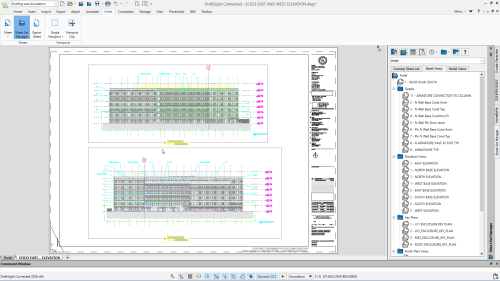
DraftSight is a professional CAD software developed by the makers of SOLIDWORKS.
It is used to create, edit, view, and share 2D and 3D DWG files with speed and accuracy.
Because it uses a familiar CAD interface, DraftSight is easy to learn.
As a result, users can start drafting productively from day one.
In addition, it supports industry-standard DWG files without conversion issues.
Why Use DraftSight?
First, DraftSight improves daily drafting productivity.
For example, users can work faster with powerful editing and automation tools.
Moreover, the software supports collaboration across teams.
Designs can be shared, reviewed, and marked up easily.
Therefore, communication errors are reduced during design workflows.
Key Features of DraftSight
- Professional 2D drafting tools
- 3D design and viewing capabilities
- Full DWG and DXF file compatibility
- Automation tools and APIs
- Familiar, easy-to-learn CAD interface
In addition, DraftSight offers flexible licensing options.
This makes it suitable for both individuals and organizations.
Who Should Use DraftSight?
DraftSight is ideal for:
- Architects and architectural drafters
- Engineers and technical designers
- Construction professionals
- Manufacturing teams
- Students, educators, and hobbyists
Because it supports both 2D and 3D workflows, it fits a wide range of industries.
DraftSight for 2D and 3D CAD Workflows
DraftSight provides a complete solution for essential drafting needs.
Users can handle detailed 2D drawings as well as basic 3D designs.
As a result, teams can standardize workflows on a single CAD platform.
This improves efficiency and reduces software complexity.
Compare DraftSight to AutoCAD and choose the solution that’s right for you
| DraftSight Professional $299 USD/yr | DraftSight Premium $599 USD/yr | AutoCAD LT $420 USD/yr | AutoCAD $1,690 USD/yr | |
|---|---|---|---|---|
| Comprehensive 2D Drafting, Drawing, Documentation, and Annotation | ![]() | ![]() | ![]() | ![]() |
| External Drawing and Image References | ![]() | ![]() | ![]() | ![]() |
| Smart Dimensioning | ![]() | ![]() | ![]() | ![]() |
| Enhanced DWG Compare | ![]() | ![]() | ![]() | ![]() |
| PDF Underlay and Export | ![]() | ![]() | ![]() | ![]() |
| DGN Import and Underlay | ![]() | ![]() | ![]() | ![]() |
| API’s (C++, C#, VB.net, VBA, JavaScript) | ![]() | ![]() | ![]() | |
| LISP | ![]() | ![]() | ![]() | |
| Macro Recording | ![]() | ![]() | ![]() | |
| Power Trim | ![]() | ![]() | ||
| Image Tracer: Convert Raster Images to DWG | ![]() | ![]() | ||
| Topo Tracer: Convert Topographic Images to DWG | ![]() | ![]() | ||
| G-Code Generator | ![]() | ![]() | ||
| Parametric Constraints | ![]() | ![]() | ||
| 3D Solid, Surface and Mesh Modeling | ![]() | ![]() | ||
| 3D navigation (Orbit, ViewCube, Wheel) | ![]() | ![]() |
* Pricing may vary
Frequently Asked Questions
What is DraftSight used for?
DraftSight is used for 2D drafting and 3D design using DWG and DXF file formats.
Is DraftSight similar to AutoCAD?
Yes. DraftSight offers a familiar CAD interface and commands, making it a strong alternative for AutoCAD users.
Who makes DraftSight?
DraftSight is developed by Dassault Systèmes, the makers of SOLIDWORKS.
