What is SOLIDWORKS Design?
SOLIDWORKS Design is a professional mechanical design software used worldwide to create, simulate, document, and manufacture products efficiently. It helps engineers and designers turn ideas into production-ready designs faster, with high accuracy and reliability.
Developed with decades of user-driven innovation and continuous R&D, SOLIDWORKS Design is known for being powerful, intuitive, and easy to learn, making it a trusted industry standard across multiple engineering disciplines.
Key Features of SOLIDWORKS Design
Trusted Industry-Standard Design Solution
Used globally by professionals in engineering, manufacturing, and product design.
Powerful 3D Design Capabilities
Create precise parametric parts, assemblies, and complex geometries with proven design tools.
Production-Ready 2D Drawings
Generate detailed technical drawings and documentation directly from 3D designs.
Engineer-Focused User Interface
An intuitive interface designed by engineers, for engineers—easy to learn and efficient to use.
Built-In Collaboration Tools
Share designs, mark up models, and collaborate in real time with teams and stakeholders.
Secure Cloud File Management
CAD-aware cloud storage with version control, revision tracking, and secure access.
End-to-End Product Development
Support workflows from concept and ideation through manufacturing and production.
Integrated Simulation, Rendering & CAM
Test designs, visualize products, and prepare for manufacturing—all within the SOLIDWORKS ecosystem.
Benefits of Using SOLIDWORKS Design
- Faster product development cycles
- Improved design accuracy and quality
- Reduced errors and rework
- Seamless collaboration across teams
- Scalable for startups to large enterprises
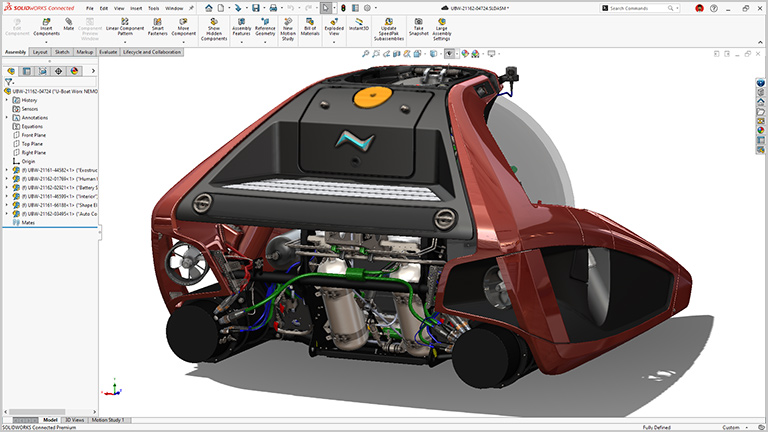
SOLIDWORKS DESIGN
The industry standard 3D CAD solution, complete with cloud functionality that brings real-time collaboration and secure file management to your workflows.
Standard
Get up to speed quickly and benefit from this powerful 3D design and manufacturing solution. Along with part, assembly, and 2D drawing functionality, specialized tools are included for sheet metal, weldments, surfacing, molds, product configuration, design analysis, DFM, and CAM. CAM included with an active subscription.
Professional
SOLIDWORKS Professional builds on the capabilities of SOLIDWORKS Standard with ECAD/MCAD collaboration, automated cost estimation, collaboration capabilities, design and drawing checking, a sophisticated components and parts library, and advanced photorealistic rendering.
Premium
SOLIDWORKS Premium builds on SOLIDWORKS Professional by adding structural and motion analysis capabilities, advanced surface flattening, reverse engineering, and electrical cable and pipe routing functionality.
Ultimate
SOLIDWORKS® Ultimate provides a holistic approach to expand into all aspects of product development. A foundational solution for professional designers and engineers, SOLIDWORKS Ultimate builds on 3D design by laying the groundwork for simulation, manufacturing, marketing, and management tools that eliminate silos and accelerate your product development processes.
Supercharge Your Everyday Productivity
- Specialized functionality handles everything from weldments and routing to mold design, sheet metal, and more.
SOLIDWORKS Toolbox covers your needs for creating holes and assembling hardware items, such as fasteners, washers, nuts, and bolts.
Built by engineers, for engineers. SOLIDWORKS Design has evolved by anticipating future design requirements, understanding how you want to work and implementing user-driven enhancements over 30+ years.

Turn Your Documentation Into a Conversation
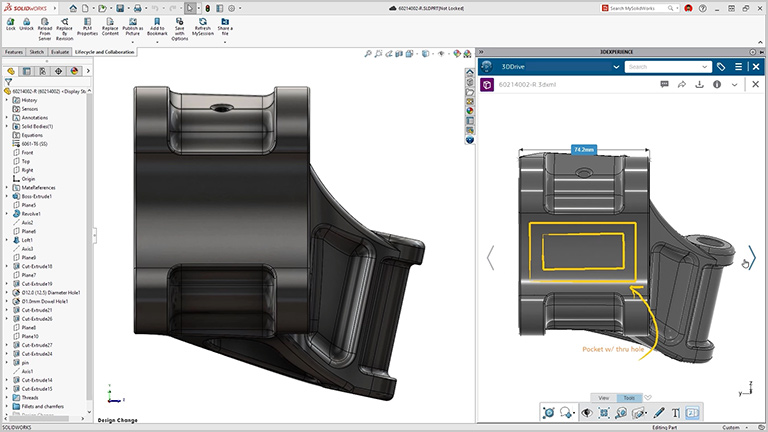
- File sharing made easy. Share your design for review with secure links from SOLIDWORKS Design without sending a physical file and never lose control of your data.
- Markup in 3D. Get easy feedback from stakeholders. Models can be shared for review and marked up directly by multiple people in 3D, all in a browser.
- Remove friction for immediate feedback. Internal and external collaborators do not need to download any extra software or viewers to review your work—it is all done through SOLIDWORKS.